
Your Safety Data Should Not Have to Be Typed Twice
Ask a functional safety engineer where the numbers in their SIL verification came from, and you will usually get an honest answer. Some came from a spreadsheet. Some came from a maintenance work order. Some came from a colleague who checked a logbook.
None of that is anyone’s fault. The data a safety study depends on is created somewhere else. Proof tests are executed and recorded by maintenance. Bypasses are applied and logged in the control system. Hazard-study recommendations are tracked in a corporate action system the safety team may not even own. The study is where all of it has to come together — but getting it there is manual, and manual work happens on a schedule that has nothing to do with the plant.
The result is familiar. Test intervals in the verification are the intervals that were assumed, not the intervals that were achieved. A bypass log is complete right up until the week somebody was busy. The gap between what the analysis says and what the facility is actually doing opens slowly, and quietly.
The Kenexis® API closes that gap
The Kenexis Integrated Safety Suite has a documented REST API built for exactly this problem. It lets the systems you already run talk to the studies you already maintain.
On the Kenexis® SIS (formerly Vertigo™) side, an integration can read the full instrumented protective function inventory — the functions themselves, and the sensors, logic solvers and final elements that make them up, along with their types, interfaces and process connections. It can also write back the things the plant knows and the study needs: proof-test records for sensors, logic solvers and final elements, and bypass activation records as protective functions are bypassed and returned to service.
On the Kenexis® Open-PHA® side, an integration can read study content and revisions, PHA and LOPA recommendations, safeguards, attached documents, and previous and industry incident records — exactly the material that corporate dashboards and action-tracking systems are forever asking someone to compile.
There is a user and user-group interface too, so account provisioning can follow the same automated path as everything else.
Each connection is scoped to a single study by its own access key, so an integration built for one study cannot reach beyond it.
What is new: create your own access key
Until now, one manual step was left in an otherwise automated story, and it sat right at the beginning. Every study connection had to be requested from an organization administrator, who created the access key by hand in the administration screens. For a team connecting a single study, that is a minor delay. For a team rolling an integration out across a site, it is a queue.
That step is now self-service. An authorized API user signs in, retrieves the list of Kenexis® SIS and Kenexis® Open-PHA® studies they are permitted to connect, and generates an access key for any of them in a single call. The list comes back showing the key they already hold for each study, so a script can see the current state before it changes anything.
Requesting a key for the same study twice simply returns the existing key rather than creating a second one. That sounds like a small detail. It is the detail that makes automation safe: a setup script can be re-run after a failure, extended to cover new studies, or rolled out to another site without anyone having to work out what it will duplicate.
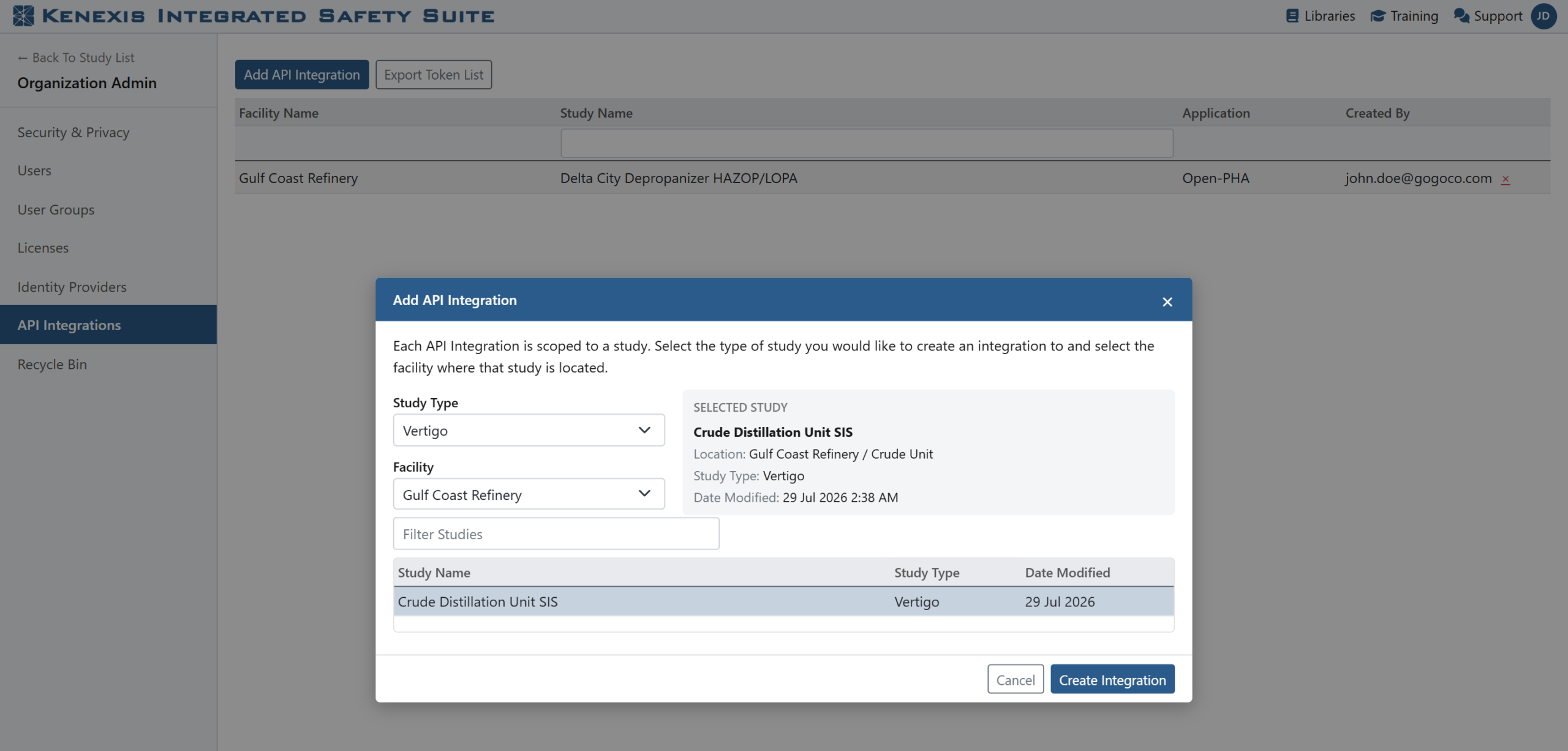
Choosing a study to connect. The list holds only studies the signed-in user is already permitted to edit.
Permissions and oversight do not move
Self-service does not mean unsupervised, and this is the part your IT and security colleagues will ask about first.
A user can only create a key for a study they are already permitted to edit. Existing access rules apply exactly as they do inside the application — the API does not open a side door. Creating integrations additionally requires an administrator role, so the ability is granted deliberately rather than held by everyone with a login.
Administrators keep the visibility they have always had. Every key in the organization stays listed in the administration screens, showing which study it belongs to, who created it, and when it was last used. Any key can be revoked at any time, and revoking it takes effect immediately.
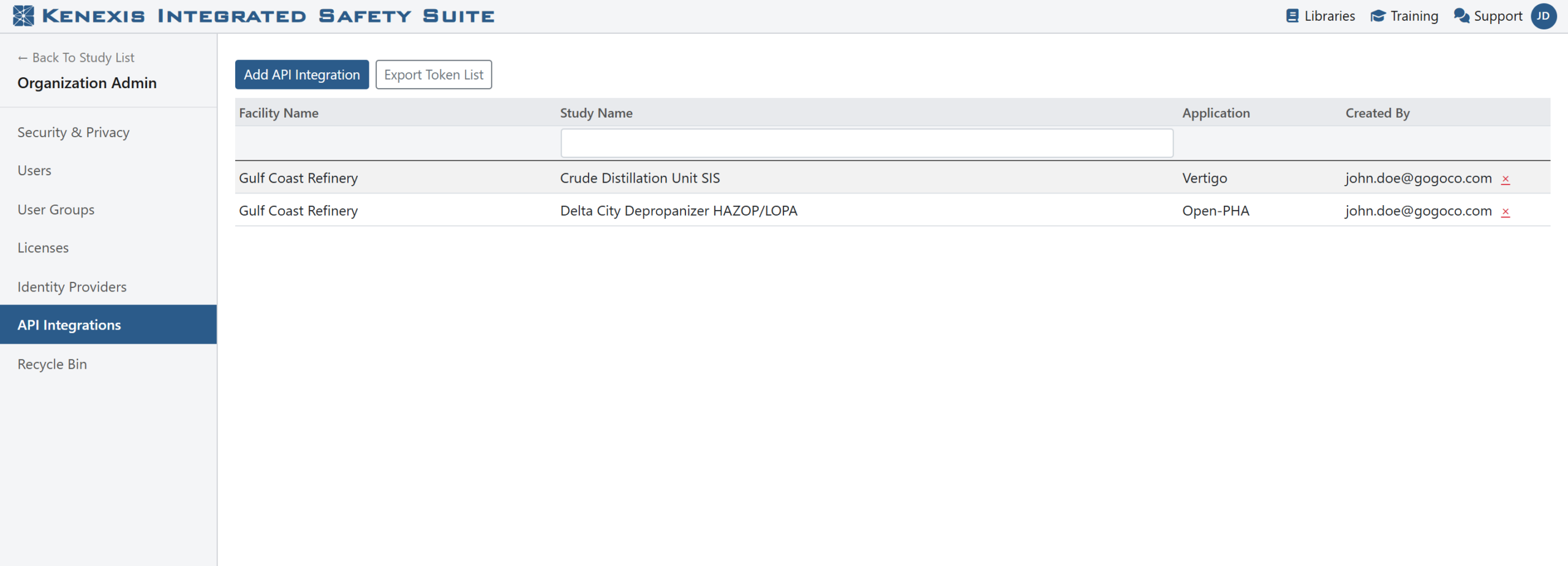
Every API integration in the organization stays listed in the administration screens, with revocation one click away.

One integration’s details: the access key, who created it, and when it was last used.
What this looks like in practice
The most common first integration is also the simplest. A technician completes a proof test and closes the work order in the maintenance system. The maintenance system posts the test record to the study. The next time anyone opens the verification, the test history reflects what actually happened in the field, on the dates it actually happened.
The second is usually bypasses. Rather than maintaining a parallel spreadsheet, the control system records each activation against the protective function it belongs to, so the record lives alongside the analysis it affects.
The third often comes from outside the safety team entirely — a reporting dashboard that pulls open recommendations and safeguards from every study, so management can see the state of hazard-study follow-up without asking anyone to assemble it by hand.
None of these ask the safety engineer to become a programmer. They ask for a documented API, an access key, and somebody in IT with an afternoon.

Proof-test history inside a study — the test intervals, last-tested and next-due dates an integration can keep current.
Getting started
The Kenexis® API is publicly documented, including the new calls for listing the studies you can connect and creating an access key for them. If you already hold an organization administrator or API administrator role, you can create your first key today and have a working connection before the end of the week.
To see how the Kenexis Integrated Safety Suite can connect to the systems you already run, contact Kenexis for a demonstration.